


A phone user on Reddit said a software update enabled a Gemini-related assistant feature by default, then launched it on its own.
The detail that sparked the strongest reaction? The user said they never chose to turn it on in the first place.
Here's what to know
The discussion started in a Reddit thread on r/mildlyinfuriating, where the OP said a software update had changed assistant settings without their input. In an edit, they added: "Something I forgot to mention too is that after it activated with no discernible input it automatically started recording audio as well." They also said, "The bit about AI isn't hyperbole either, the prompt that opened with it specified it was for Gemini."
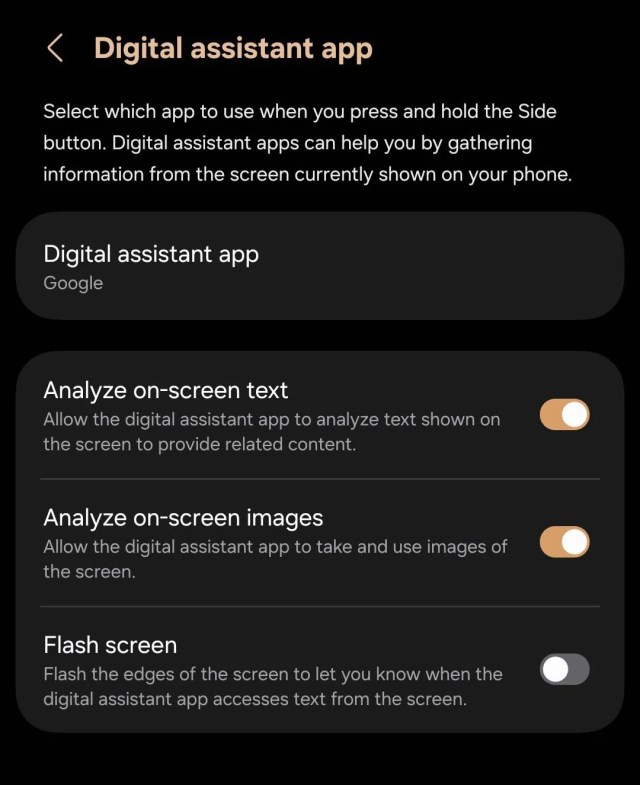
Much of the reaction centered on the screenshot showing the default setup. Users focused on the idea that the feature seemed to be enabled unless users turned it off.
One user said, "Defaulting everything except for the feature that alerts you to what's happening is so sketchy, ew."
There was not complete agreement about the audio issue.
TCD Picks » Quince Spotlight
💡These best-sellers from Quince deliver affordable, sustainable luxury for all




Pushing back on that part of the concern, one user said: "The 'automatic audio recording' is only activated if you set up hey google. If you didn't do that, it didn't get activated."
More background
Users treated the incident as an example of AI features being added quietly and only noticed later in settings menus. The OP tied this case directly to Gemini by saying the prompt identified it that way.
The OP said the device was a "Galaxy S24 FE."
For some users, the issue was not just inconvenience but the possibility of sensitive information being exposed. One said, "I just think what happens if this is a lawyers work phone, or someone who has sensitive information potentially on the device."
Others focused on what may already have happened before a user notices a change after an update. In reply to a comment about checking settings after updates, one user said, "And it's too late, because it already scraped your data" — an unverified claim, but one that reflected the frustration and suspicion running through the thread.
What can be done?
The most practical help in the thread came from users explaining where to look in settings. When one user asked where to check, another replied: "Go to your settings on your samsung phone and search 'Digital assistant app.'"
The replies also suggested that users may need to confirm which parts of an assistant feature are actually turned on. Since one user said audio recording only becomes active if "hey google" has been set up, checking voice activation settings separately may help clarify whether an assistant is enabled, listening, or both.
For some users, the frustration went beyond switching a single toggle back. In reply, the OP said, "New motorola signature 27 will support grapheneOS by default out of the box," signaling that some people are already considering alternative software options when default assistant settings feel too invasive.
Where can I learn more?
This isn't the first time Google's AI push has frustrated users. These stories cover Gemini rollouts, assistant mistakes, Pixel update frustrations, EU scrutiny, and Google's broader AI push.
• Google pushed Gemini into Workspace by default, frustrating users who could not disable it.
• Google's assistant kept giving wrong information, eroding some users' confidence in the tool.
• Pixel owners said suspicious phone updates worsened battery life and made repairs harder.
• In the EU, regulators opened an antitrust investigation into Google over AI features.

Get TCD's free newsletters for easy tips, smart advice, and a chance to earn $5,000 toward home upgrades. To see more stories like this one, change your Google preferences here.